
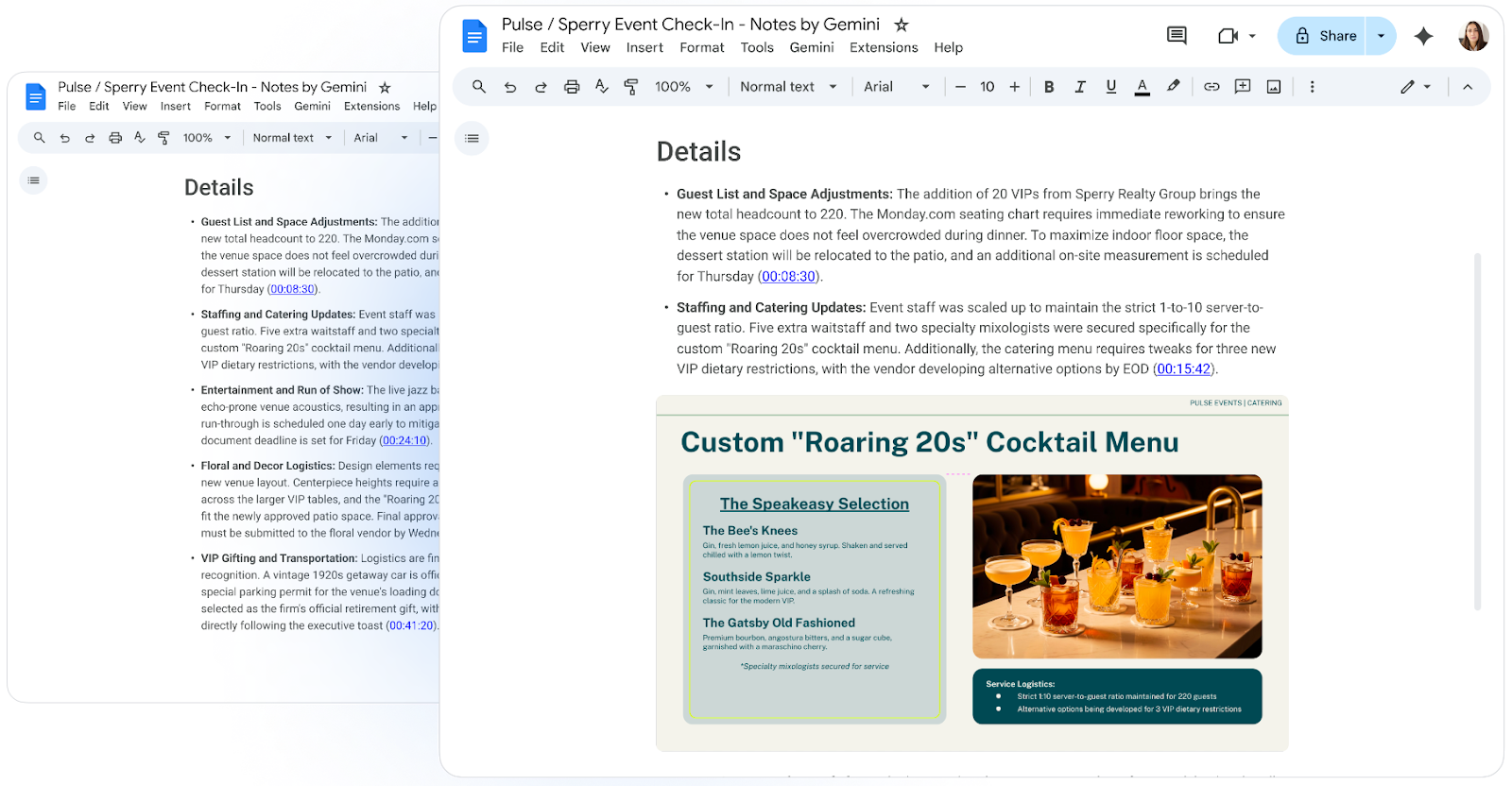

Traditional video call transcripts record dialogues and agreements reached, but frequently omit the visual context presented during a presentation. To address this limitation, Google is updating the “Take notes for me” feature in Google Meet by integrating automatic image and chart captures presented on screen directly into the final meeting notes document.
The Value of Visual Context in Automated Meeting Notes
When teams analyze financial metrics, architecture diagrams, or data tables during a video call, purely text-based records can be incomplete. With this new feature, Gemini AI detects shared content during the session (slides, charts, and diagrams) and automatically inserts visual screenshots into the Google Docs document generated at the end of the meeting.
This integration ensures that spoken information and visual elements are unified in one place, reducing the time spent drafting summaries or requesting supporting materials after every session.
Admin Controls and Prior Configuration
To ensure compliance with internal confidentiality policies, the platform provides IT administrators with centralized control over this feature. From the Admin Console (Apps > Google Workspace > Google Meet), administrators can define two operational behaviors:
- Always allow: Authorizes automatic image captures during any presentation when note-taking is active (default option).
- Allow only when recording: Restricts screenshot generation exclusively to meetings where full video call recording is also enabled.
Notifications and User Interaction During Meetings
The system incorporates transparency and real-time management for presenters and participants:
- Automatic alert when presenting: When screen sharing begins in a video call with notes enabled, the presenter receives an on-screen notification informing them that Gemini will capture images of the shared material.
- Immediate disabling: Presenters or participants can enable or pause visual captures at any time through the Google Meet side panel for notes.
- Enterprise data protection: Captured images follow Google Workspace enterprise-grade security and privacy standards, ensuring strict protection of corporate information.
Availability and Compatible Editions
This enhancement is available for organizations with active licenses for:
- Google Workspace Business: Standard and Plus.
- Google Workspace Enterprise: Standard and Plus.
- Google Workspace Education: Google AI Pro for Education.
Boost Your Organization’s Productivity with G Nerd
The strategic implementation of Google Workspace artificial intelligence eliminates repetitive administrative tasks and accelerates decision-making across your business. At G Nerd, we guide your organization through licensing, security policy configuration, and ongoing staff training.


2 Comments