
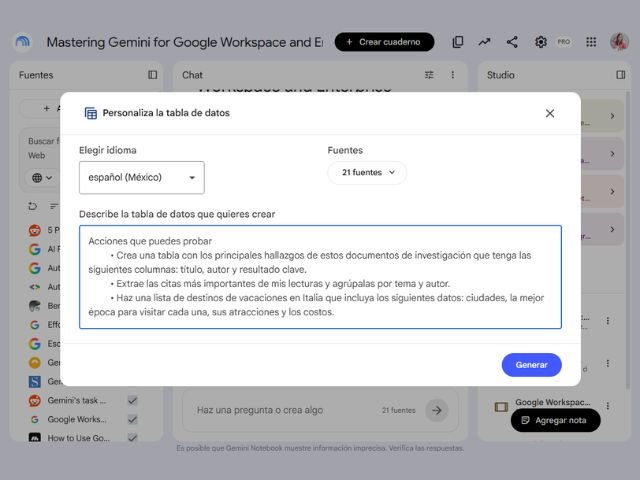

Organizing scattered data from multiple documents is usually a slow and tedious task. To solve this, Google has launched Data Tables in Gemini Notebook, a feature that allows you to process files in various formats to automatically organize them into rows and columns, making data-driven decision-making easier and enabling direct export to Google Sheets.
Below, we explain how to implement this tool in your business workflows.
How to Apply Data Tables in Your Business
The integrated artificial intelligence processes text, audio, and transcripts to consolidate information into a clean visual format. Your team can leverage this feature across different strategic areas:
- Automatic meeting minutes: Transform the transcript of a work session into a structured list of pending tasks, categorized by assignees, deadlines, and priority levels.
- Competitor analysis: Process documentation or commercial data from your competitors to generate comparative matrices of pricing, operational advantages, and market strategies.
- Project management: Gather business goals, key performance metrics, and project leads from your bi-annual plan into a single unified structure.
Availability and Compatibility in Google Workspace
This feature is automatically and gradually activated within the interface, requiring no advanced technical configurations from the system administrator. The tool is available for the following business and education plans:
| Segment | Compatible Plans with Gemini Notebook |
|---|---|
| Business | Business (Starter, Standard, Plus) and Enterprise (Starter, Standard, Plus) |
| Education | Education (Fundamentals, Standard, Plus) and Google AI Pro for Education |
| Other Sectors | Frontline, Essentials, and Nonprofits (NGOs) |
G Nerd Recommendation: Export the generated tables to Google Sheets to apply advanced filters, run mathematical formulas, and share information in real time with your team, maximizing the value of the AI-organized data.
Master Google’s Artificial Intelligence in Your Business
The value of tools like Gemini Notebook increases when teams adopt them under a clear strategy that eliminates repetitive operational tasks. At G Nerd, we manage your Google Workspace licenses with specialized support and train your staff to implement Google AI under strict security and efficiency standards.

