

Virtual meetings have become the core of collaboration. How many times have you felt like you’re losing track of a meeting, joined late due to an unforeseen event, or needed an immediate summary of commercial agreements?
Google Workspace announced a key update for its “Ask Gemini” feature in Google Meet for the web.
What is “Ask Gemini” in Google Meet?
This feature acts as a virtual executive assistant that accompanies you during your video conferences. Gemini listens, processes, and structures information in real time so you only have to worry about adding value to the conversation.
The Big New Feature of 2026: Greater Accessibility
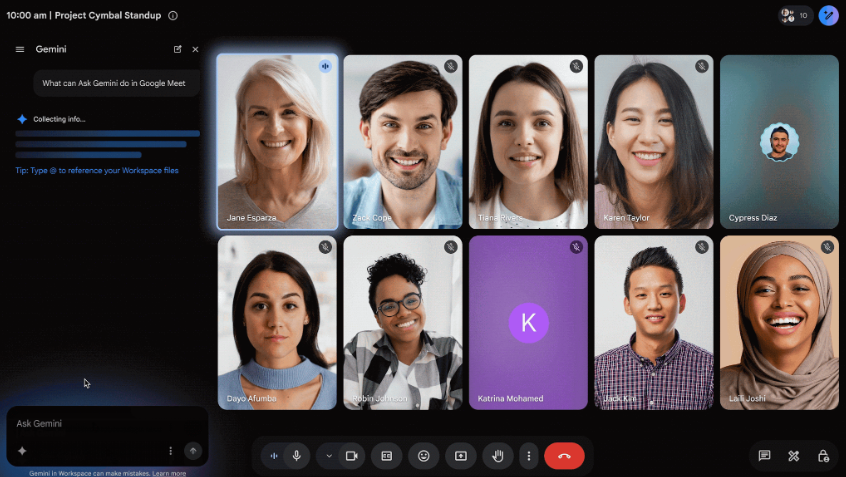
Previously, to interact with Gemini you had to hover over an icon in the upper right corner, which caused many users to overlook the tool. With the new update, Google has moved the “Ask Gemini” dialog box to the bottom left corner of the Meet web interface. This design change drastically increases its visibility, allowing your team to leverage AI with just a single click.
How to Use “Ask Gemini” in Google Meet
- Start or join a meeting: Access your Google Meet session as usual from your web browser.
- Locate the assistant: Head to the bottom left corner of the screen. You will see the new dialog box or the direct prompt for “Ask Gemini”.
- Activate automatic notes (Optional but recommended): To get the best performance for catching up if you join late, make sure the Take notes for me feature is enabled in the call.
- Interact with the AI: Click on the text box and type your request. You can also select some of the quick commands suggested by the system.
- Review the results in real time: Gemini will display the requested information in a side panel without interrupting the flow of the video call or the visibility of the participants.
Benefits of “Ask Gemini” for Businesses
Implementing Google AI in daily meetings is not just a matter of modernity; it is a high-efficiency strategy.
- Instant and uninterrupted catch-ups: If a manager or collaborator joins the session late because they were attending to a client, they no longer have to interrupt the meeting by asking “what did I miss?”. They can just ask Gemini for a quick summary of the topics covered up to that point.
- Optimizes productivity by automating documentation post-meeting, eliminating the need to spend time writing minutes manually so the team can focus on execution.
- Extracts agreements, decisions, and action plans with clarity, ensuring that all participants always maintain focus on the original goals of the session, even if the conversation veers off-topic.
How to Get It for Your Business?
This update is rolling out gradually on a global scale and is available for organizations with the following Google Workspace business plans:
If your enterprise features organizations that already have “Ask Gemini” enabled, this visual accessibility improvement will be activated by default for both administrators and end users.
Do You Want to Bring Google Artificial Intelligence to Your Business?
Optimizing your business’s internal processes has never been easier. At G Nerd, we help you with consulting, migration, configuration, and adoption of Google Workspace and its advanced Gemini tools.
Contact us today at G Nerd and discover how we can transform your organization’s productivity with the best cloud solutions.


One Comment