
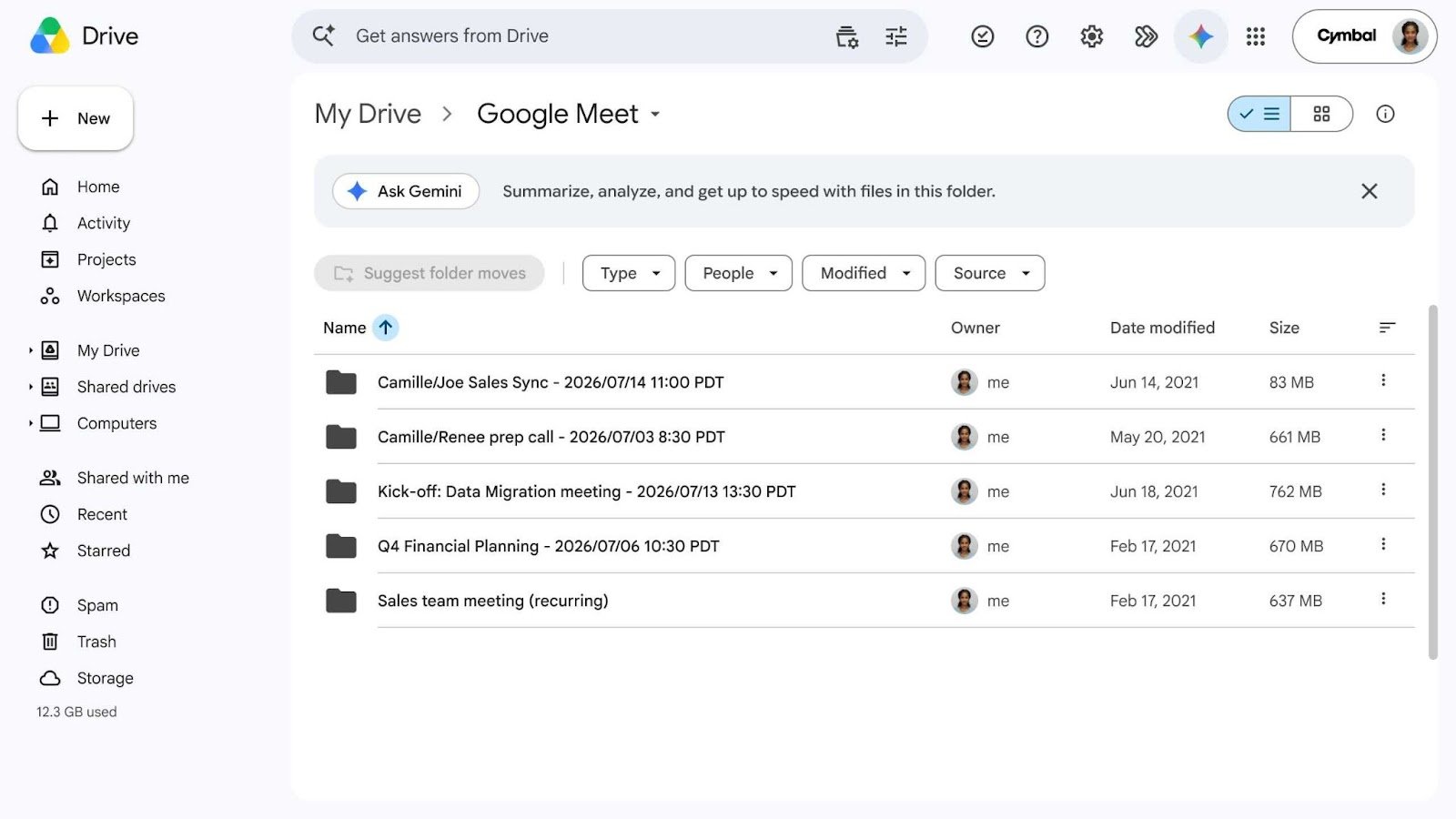

Google has updated the Google Meet storage architecture in Google Drive. Moving forward, all resources generated during a video call are automatically organized into structured folders per meeting.
How does the new Google Meet file organization work?
Previously, when a session was recorded or when transcripts and notes were generated using AI, the files were saved in bulk within a generic folder called «Meet Recordings» in the organizer’s drive.
With the new update, Google implements a smarter folder topology:
- Centralized main folder: A root folder called «Google Meet» is automatically created in the host’s drive (My Drive).
- Subfolders per meeting: Inside the main folder, Google Drive creates a specific subfolder for each meeting, grouping the recording, transcript, and Gemini-generated notes all in one place.
- Recurring meetings management: Calls that are part of the same series or weekly follow-up share a single subfolder, making it easier to check the full history without duplicating locations.
- Simplified access for participants: Meeting attendees with access permissions will automatically see shortcuts to these files within their own Google Meet folders in Drive.
Automatic transition: What happens to your previous recordings?
Google has designed this change to run seamlessly and without data loss:
- Migration of historical files: The existing «Meet Recordings» folder will automatically be moved inside the new «Google Meet» structure and renamed to «Legacy Meet Recordings».
- Coexistence period: During the rollout phase, users may temporarily see both folders in their Google Drive browser until the reorganization is complete.
Note for IT administrators by G Nerd: If your company uses API scripts or automated workflows that depend on the «Meet Recordings» folder name or ID, we recommend auditing and updating the paths to the new «Google Meet» folder to avoid disruptions.
Availability and compatible Google Workspace plans
This improvement in storage architecture requires no additional setup from admins and is enabled for the following plans:
| License Category | Availability and Conditions |
|---|---|
| Business and Enterprise Plans | Available for all editions (Business Starter, Standard, Plus, and Enterprise). |
| Education and Public Sector | Enabled for Google Workspace for Education and Nonprofits editions. |
| Individual Plans | Active for Google Workspace Individual subscribers. |
Optimize knowledge management in your business with G Nerd
Standardizing how your team stores and reviews meeting notes reduces operational friction and ensures key information isn’t lost across departments.
At G Nerd, we specialize in Google Workspace consulting, migration, and architecture. We help you securely configure your corporate environments and empower your team to master Google’s collaboration and Artificial Intelligence tools.


2 Comments