
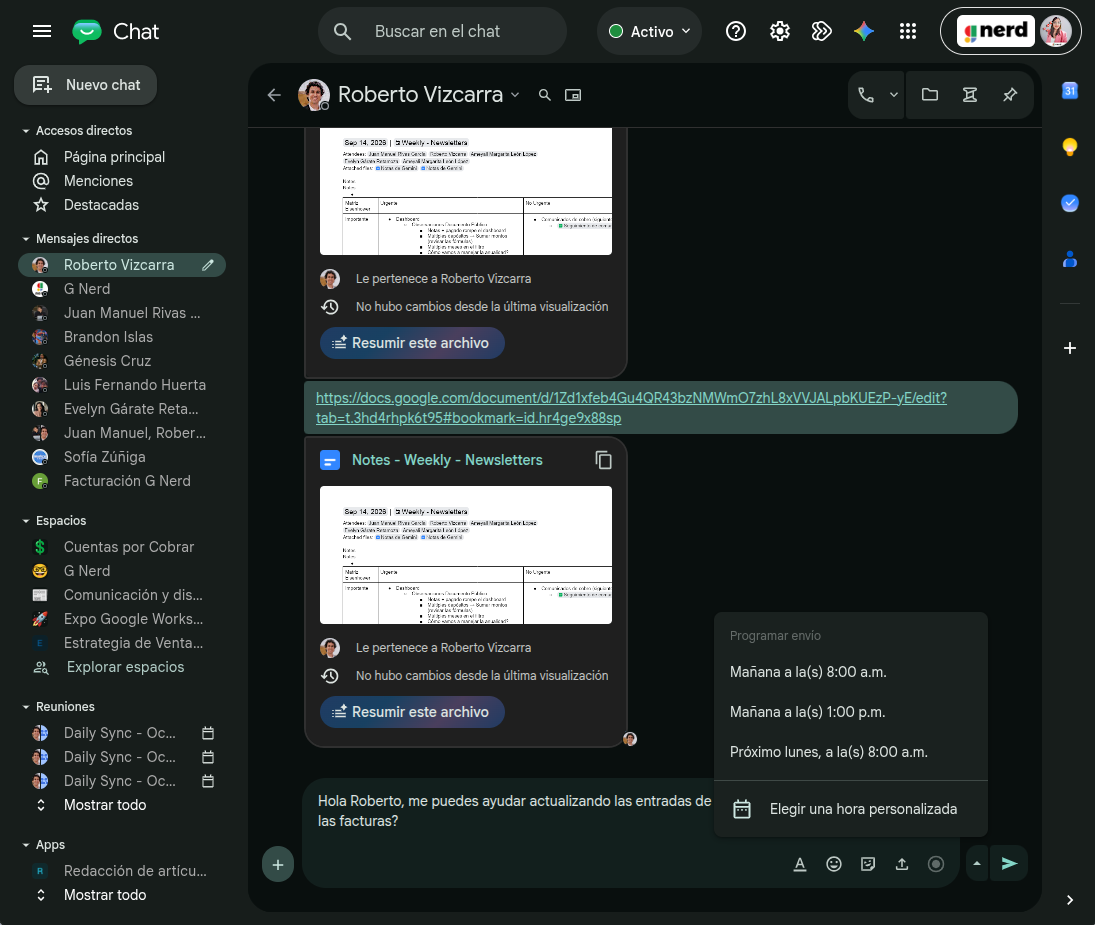

Maintaining respectful and efficient internal communication is essential for any business. To help teams better manage their time, Google has rolled out a highly anticipated feature: the ability to schedule messages in Google Chat so they send automatically at a later date and time.
This update makes it easier to manage internal communication across teams distributed across different time zones, allowing you to draft messages in advance without disrupting recipients during off-hours.
Here is how to implement this tool in your day-to-day operations.
How to schedule a message in Google Chat
The feature is natively integrated into the interface and allows scheduling messages in 1:1 or group conversations up to 120 days in advance. To use it, follow these steps:
- Draft your message: Open Google Chat on your computer or mobile device and compose your text within the relevant conversation channel.
- Open the scheduling menu: Instead of clicking the standard send button, click the drop-down menu (down-arrow icon) located next to the send control.
- Set the date and time: Select the exact moment you want the recipient to receive the information and confirm the action to save the scheduled message in the system.
How to manage, edit, or cancel scheduled messages
To modify content or adjust delivery timing before a message is sent, the interface provides two centralized management options:
- The Conversation Banner: A notification banner appears at the top of the chat containing the pending message. Clicking this banner allows you to make any necessary adjustments.
- The Drafts shortcut: A dedicated section in the left navigation panel gathers all of the user’s scheduled messages. From here, you can edit the content, reschedule the delivery time, send immediately, or permanently delete the message.
Availability
Available to all Google Workspace customers, Workspace Individual subscribers, and users with personal Google accounts.
Take your company’s productivity to the next level
Scheduling message delivery is an important first step, but aligning your team’s communication under a structured digital strategy reduces operational overhead and optimizes overall business performance. At G Nerd, we provide Google Workspace licensing with dedicated Spanish-language support and train your team to adopt tools like Chat, Meet, and Gemini efficiently.


One Comment