
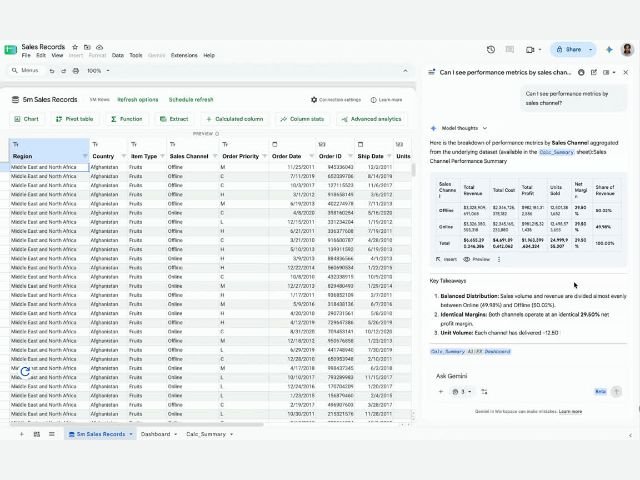

Exploring millions of corporate records to make strategic decisions often requires advanced SQL knowledge or constant reliance on the data team to build custom queries and reports. To break down these technical barriers and democratize big data analysis (Big Data), Google introduces a game-changing update: the ability to analyze BigQuery data using natural language with Gemini directly in Google Sheets.
From complex SQL queries to a simple conversation
Until now, Connected Sheets allowed organizations to link spreadsheets with BigQuery data warehouses to process billions of rows. However, structuring pivot tables, designing charts, or defining aggregation formulas rested entirely on the user’s technical expertise.
With this update, the Gemini side panel in Google Sheets functions as an interactive data analyst querying the entire BigQuery dataset (not just the rows visible on screen) based on everyday questions asked in natural language.
Key capabilities of analyzing with Gemini and BigQuery
This synergy introduces a comprehensive analytical workflow inside Google Sheets:
- Direct natural language queries: You can ask direct questions in the side panel, such as: “What were the total sales last quarter in the northern region?”, and Gemini will process the massive BigQuery dataset to return the exact answer instantly.
- Drill-down and interactive iteration: Keep the conversation thread going with follow-up questions, for example: “How does this compare to the same quarter last year?” or “What were the top 5 products driving that growth?”.
- Automated creation of dashboards and connected reports: You can request a comprehensive view like: “Create a quarterly sales review with revenue by region, monthly trend, and a top 10 products breakdown.” Gemini will first present its plan of action for your review and, upon approval, generate a new tab with pivot tables, charts, and native BigQuery-connected formulas, fully refreshable in real time.
- Less overload for data teams: By empowering sales, marketing, finance, and operations teams to resolve their questions directly, the volume of ad-hoc requests for data engineers and BI specialists drops significantly.
How to get started
- Open your connected sheet: Open a Google Sheets file that already has an active BigQuery connection (Data > Data connectors > Connect to BigQuery) and for which you have permissions to query the data.
- Open the Gemini side panel: Click the Gemini icon in the top toolbar or on the right side panel of Sheets.
- Start asking: Type your natural language query about the variables, metrics, or trends you need to analyze.
Availability and account requirements
This feature is enabled by default (no prior action required by IT administrators) for users with BigQuery query permissions and the following licenses:
- Google Workspace Business: Business Standard and Business Plus editions.
- Google Workspace Enterprise: Enterprise Standard and Enterprise Plus editions.
- Education: Accounts with the Google AI Pro for Education add-on.
- Individual accounts and add-ons: Google AI Pro and Google AI Ultra plans, as well as licenses with the AI Expanded Access add-on.
Rollout: Gradual rollout starting on October 19, 2026, for both Rapid Release and Scheduled Release domains.
Drive a data-driven culture in your company with G Nerd
Enabling your teams to analyze millions of business data points with conversational ease accelerates decision-making and amplifies your cloud return on investment. At G Nerd, we guide your organization through the strategic deployment of Google Workspace and Google Cloud, BigQuery integration with Sheets, access governance, and continuous staff training.