
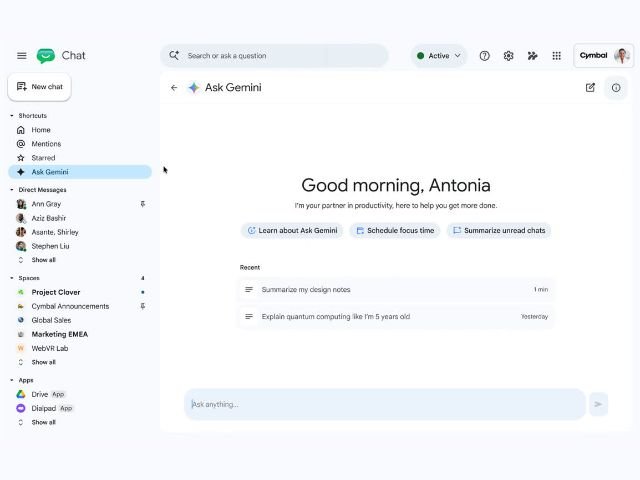

Searching for a specific agreement, summarizing lengthy conversation threads, or tracking information across multiple team spaces often slows down the workday. To address this challenge and streamline internal communication, Google is launching Ask Gemini in Google Chat, allowing users to query the AI assistant directly from the messaging interface.
AI queries without leaving the conversation
Previously, when a user needed to summarize a long discussion or look up information stored in another document to reply to a colleague in Google Chat, they had to switch tabs or search manually across different apps.
With Ask Gemini in Google Chat, users have an interactive side panel powered by Gemini AI. This integration enables natural language queries to extract real-time context, process conversation details, and draft structured responses without interrupting the chat flow.
Key capabilities of Ask Gemini in Chat
Bringing the assistant into corporate messaging offers advanced capabilities to optimize daily productivity:
- Conversation and thread summarization: Ask Gemini to generate a summary of unread messages in a team space or extract key points from a long thread.
- Cross-app information search: Retrieve data stored across Google Workspace (such as emails in Gmail, files in Drive, or events in Calendar) directly from the Chat window.
- Drafting and content generation: Ask Gemini to draft a message, write a team announcement, or refine the tone of a response before sending.
- Context-aware channel answers: Get clarification on past decisions made in the space without having to scroll through the full message history.
Availability
This update is rolling out natively on the Google Chat web interface for organizations with eligible licenses that include AI add-ons or enterprise-tier Gemini subscriptions:
- Business: Business Standard and Plus
- Enterprise: Enterprise Standard and Plus
- Education add-ons: Google AI Pro for Education
G Nerd Note: This change will only affect users who have English set as their Google account language. Users with other language preferences can continue using the side panel, as this update will not affect them. Support for additional languages will be added in the future.
Optimize your company’s communication with G Nerd
Harnessing the potential of artificial intelligence within daily communication tools eliminates bottlenecks and reduces operational response times. At G Nerd, we guide your organization through strategic Google Workspace licensing, security policy configuration, and ongoing technical training for your team.

