
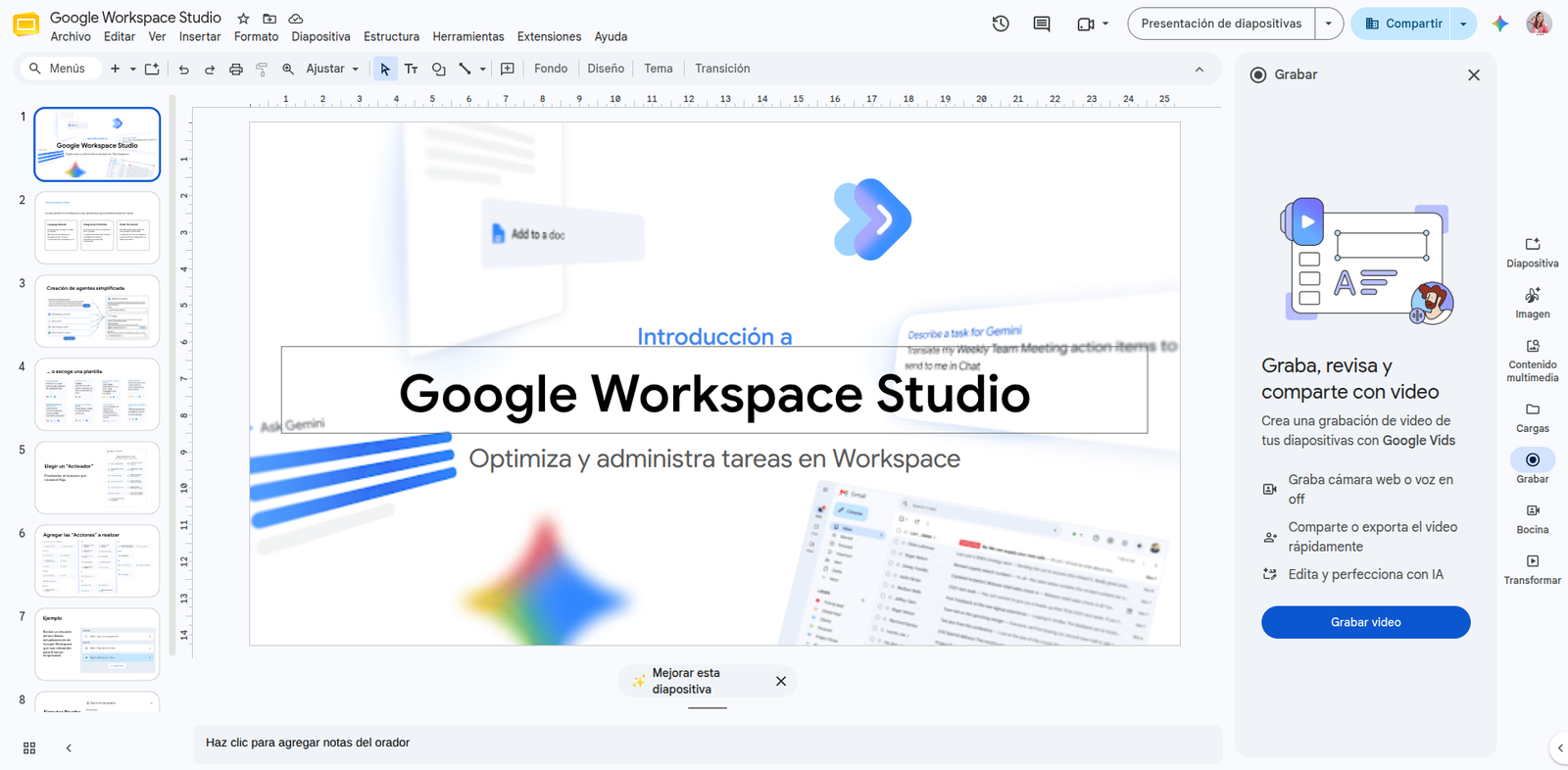

Turning a static presentation into dynamic video content used to require external editing software or complex screen configurations. To simplify this process and centralize content creation within the cloud, Google introduces direct integration between Google Slides and Google Vids, allowing you to seamlessly record presentations directly from the slides interface.
From slide format to video format in seconds
With this update, organizations no longer need to rely on standalone screen recorders to create training materials, business proposals, or executive reports. When opening any presentation in Google Slides, the right side panel now includes a dedicated Recording option that triggers the simplified workflow powered by Google Vids.
This integration allows users to:
- Choose the capture mode: Record screen and camera simultaneously (Picture-in-Picture mode), audio only for voiceover, or just the slide projection.
- Generate instant links: Once the session ends, the system processes the content and delivers a link ready to share with your team or external clients.
- Maintain tool coexistence: For companies using the legacy Slides recording method, that option has been moved to the top menu (View > Slides recording), enabling an orderly transition between both experiences.
Advanced editing capabilities inside Google Vids
The main advantage of this flow is that the resulting video is not limited to a rigid recording. By transferring the presentation to the Google Vids environment, users gain access to a full AI-driven production studio:
- Transcript-based editing: Trim or delete video clips directly by editing the auto-generated transcript text.
- Voiceover generation: Add AI-narrated voiceovers or background music tracks to give the material a professional finish.
- Style adjustments and graphic assets: Easily insert additional visual elements, transitions, and brand customization without leaving the browser.
Availability and rollout
This enhancement requires no prior setup by IT administrators and is available for:
- Business and education accounts: All Google Workspace editions.
- Individual and personal subscriptions: Workspace Individual subscribers and users with personal Google accounts.
Boost your business communication with G Nerd
Leveraging video and artificial intelligence tools in Google Workspace helps professionalize internal communications, optimize training times, and stand out when presenting business proposals. At G Nerd, we guide your organization through strategic license adoption, cloud security management, and ongoing team training.


One Comment