
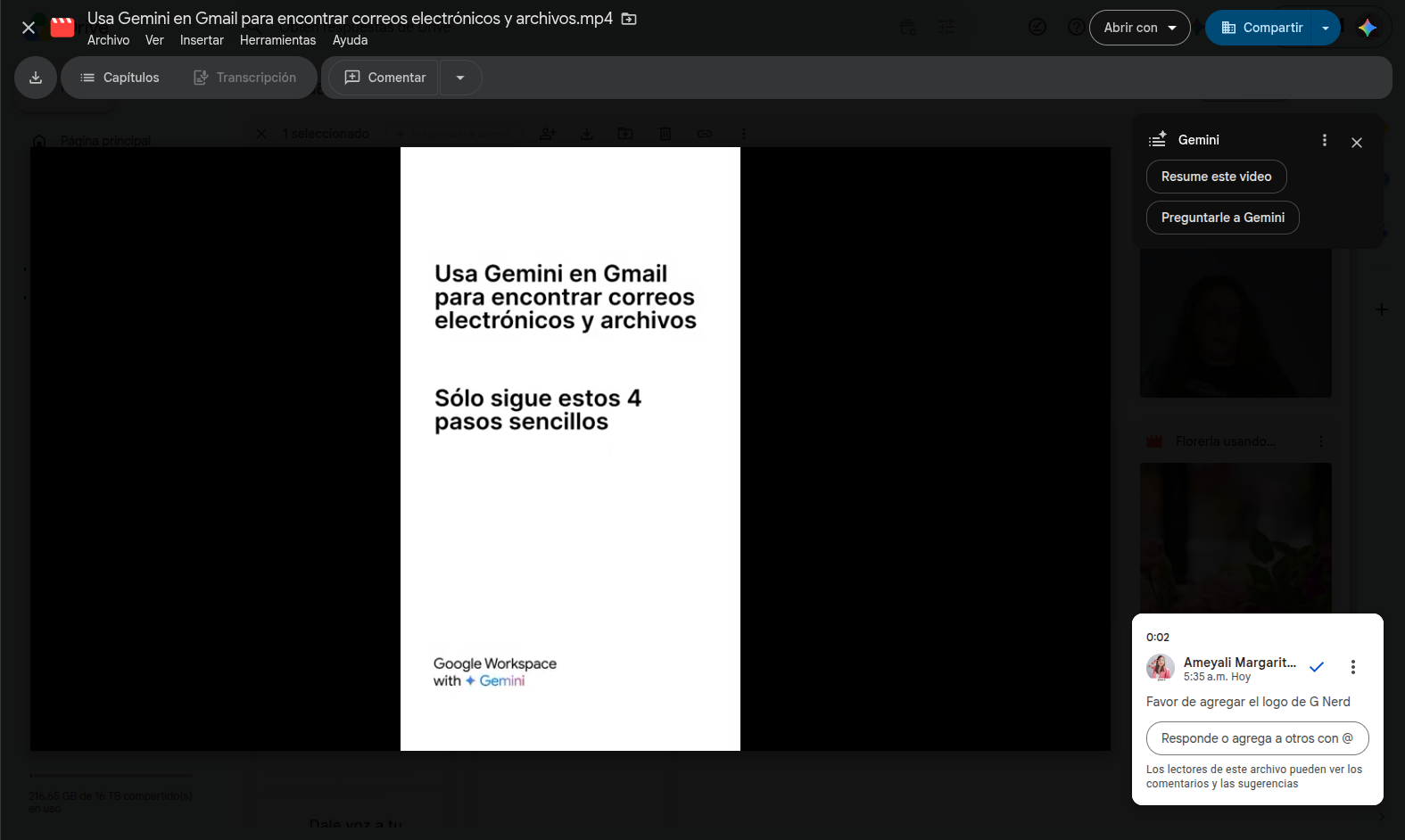

Reviewing media files and coordinating edits across teams is often a chaotic process if feedback relies on external emails, handwritten minutes, or messages in chat apps. To bridge this communication gap, Google is launching timestamped comments for videos on the web version of Google Drive.
Clear, contextual, and real-time feedback
Previously, when a team evaluated a recorded presentation, a promotional video, or training material, they had to write instructions such as “review at 02:45” within a separate text document. With the new Google Drive update, users can pin their comments directly to the exact minute and second they occur.
When reviewing a video on the web, the commenting interface features a split button that lets you choose between two modes:
- File-level comment: Ideal for global evaluations of the content.
- Timestamped comment: Links the note to the specific second where the player is paused.
How to use timestamped comments in Google Drive?
To add a file-level comment, follow these steps:
- Open the video: Open a video file in Google Drive.
- Select comment mode: In the top right corner, click the dropdown menu in the comment box and select File-level comment.
- Draft note: Type your comment in the text field.
- Save: Click Comment.
To add a timestamped comment, follow these steps:
- Open the video: Open a video file in Google Drive.
- Locate the moment: Play the video or drag the slider to the moment you want to comment on.
- Activate comment box: In the top right corner, click “Comment”.
- Draft note: Type your comment.
- Save: Click Comment.
> Additional notes: To view existing comments at specific moments, click the indicators on the video player timeline. To play videos in Drive, third-party cookies must be enabled.
Key benefits for your business processes
- Unambiguous contextual communication: Eliminates confusion about which scene, graphic, or audio a suggested change refers to.
- Faster review and approval cycles: Drastically reduces delivery turnaround times on media content projects.
- Centralized workflows: Avoids using third-party review tools, keeping all media assets and conversations secured under Google Workspace infrastructure.
- Native integration: Works directly on the web without needing extra extensions or editing software.
Availability and integration into your workspace
This update is available by default for all Google Workspace customers, Google Workspace Individual subscribers, and personal Google account users, requiring no prior configuration from IT administrators.
Streamline your company’s workflows with G Nerd
Adopting cloud collaboration tools allows organizations to eliminate operational bottlenecks and work smarter. At G Nerd, we guide you through licensing Google Workspace and train your employees to make the most of Google’s productivity and Artificial Intelligence capabilities.

