
At G Nerd, we know that effective communication is key to any company’s success. Google Workspace offers a powerful set of tools to achieve this, and Google Chat is one of the most widely used for team collaboration. To make your messages even clearer and more engaging, Google Chat has added support for Markdown styles, and the great news is that you can now see these styles in real time as you type!
What is Markdown and Why is it Important for Google Chat?
Markdown is a lightweight markup language that allows you to format your text using special characters. It is a simple and fast way to add emphasis, structure information, and make your messages more readable without needing complex menus. For teams that rely heavily on Google Chat, this means:
-
- Improved Clarity: Highlight crucial information with bold or italics.
- Simple Organization: Create bulleted lists for summaries or tasks.
- Precise Technical Communication: Share code snippets legibly with code blocks.
What’s New: Real-Time Markdown Formatting!
Previously, when you applied Markdown styles in Google Chat, the text would only convert to its final format after the message was sent. This could be a bit tedious, as you didn’t have an immediate preview of how your message would look.
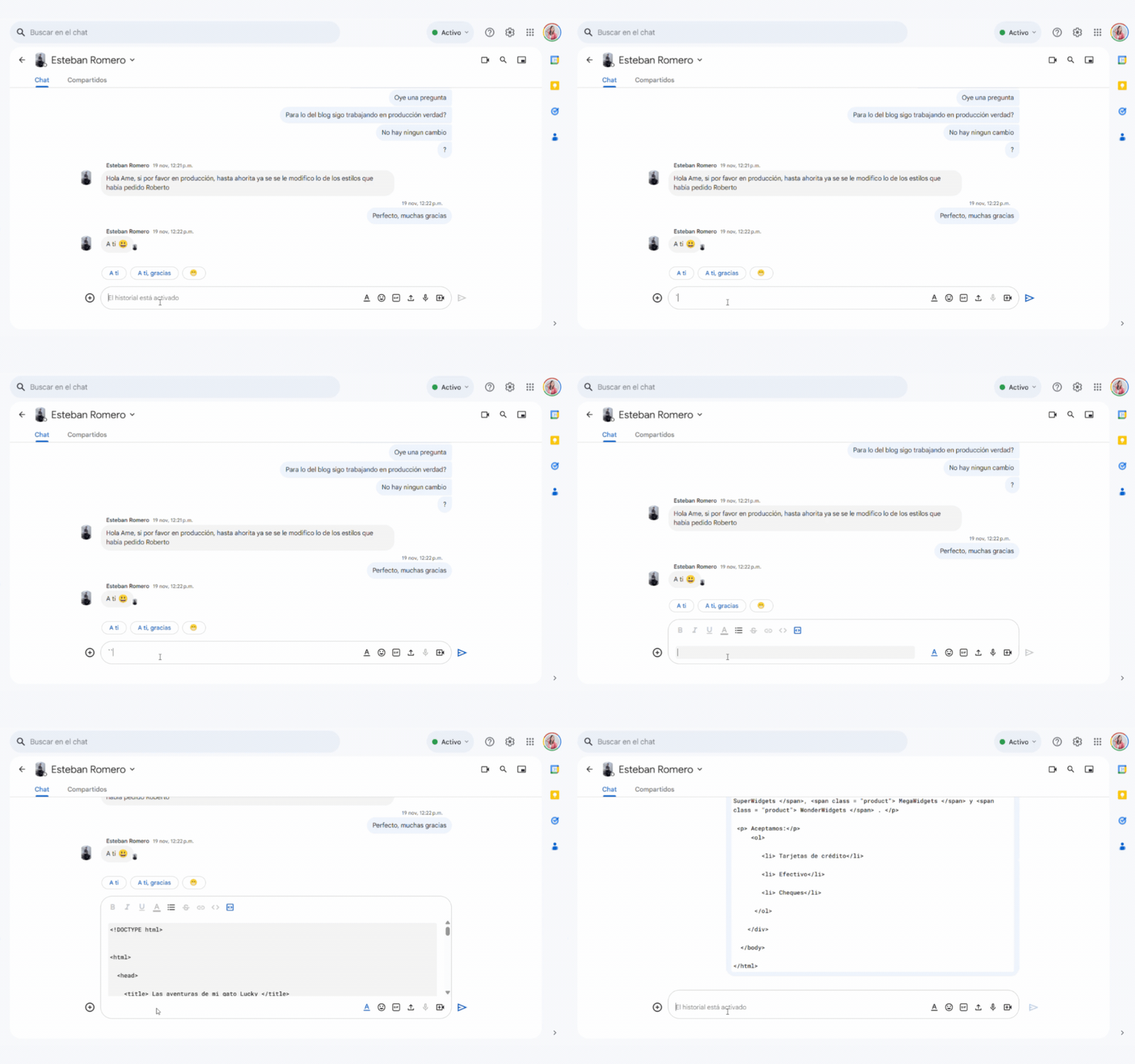
But that has changed! Google Chat now supports real-time Markdown styling directly in the compose bar. This means that as you type and apply Markdown characters, the text will format instantly, giving you an accurate preview of your message before sending it. Additionally, full support for inline code and code blocks has been added to the compose bar, making communication between developers and technical teams even easier.
This update is a big step toward improving the user experience, making message composition more intuitive and efficient. It is being rolled out gradually to Rapid Release and Scheduled Release domains and is already available to all Google Workspace customers, Google Workspace Individual subscribers, and users with personal Google accounts.
How to Add Markdown Styles to Your Messages in Google Chat
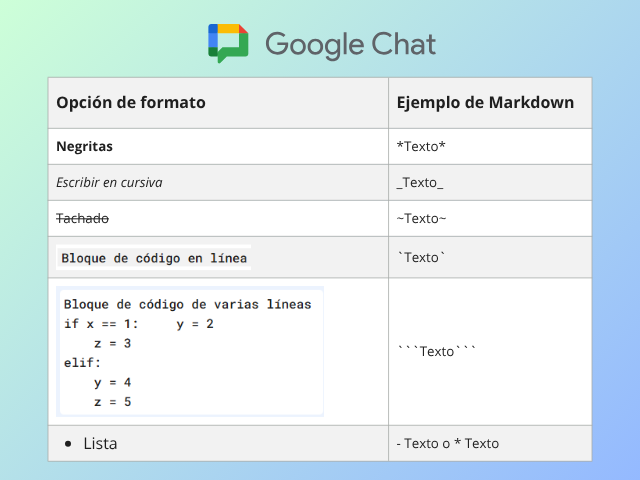
Adding formatting to your messages is incredibly simple. Here is a quick guide to the most common Markdown styles you can use:
| Markdown Option | Text Example |
|---|---|
| *Bold* | Bold |
| _Write in italics_ | Write in italics~ |
| ~Strikethrough~ | |
| `Inline code block` | Inline code block |
| “`Multiline code block”` | Multiline |
| – List or * List |
|
Optimize Collaboration with G Nerd
At G Nerd, we are committed to helping you get the most out of Google Workspace tools. Understanding and using these small features, like Markdown in Google Chat, can make a big difference in the efficiency and clarity of your internal communication.
If you are looking to take your company to the next level with expert Google Workspace consulting or boost your digital marketing campaigns with Google Ads, feel free to contact us. We are your strategic ally for growth!

