
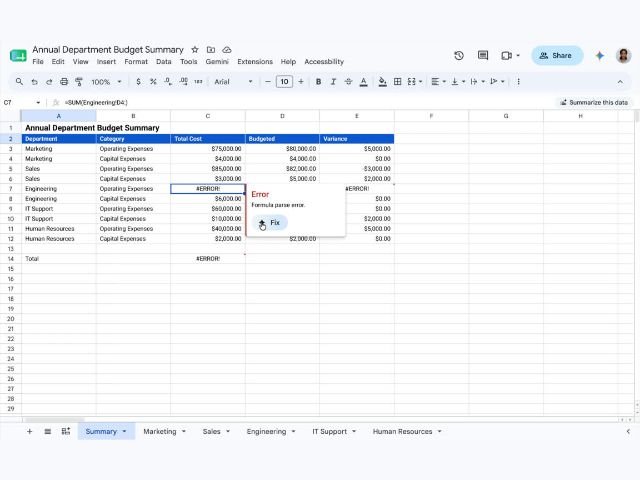
We are pleased to introduce a new Gemini feature in Sheets that allows you to diagnose and fix formula errors with a single click. When a formula error occurs, Gemini analyzes the surrounding data structure to offer a clear explanation of the main issue, along with the corrected version of the formula. This feature seamlessly supports everything from basic arithmetic operations to complex calculations, simplifying what is traditionally a frustrating and time-consuming debugging process.
Since Gemini is integrated directly into Sheets, it removes the barrier of writing complex formulas for advanced analysis within the same workspace. This ensures that both novice users and experienced data analysts can keep up the pace without having to manually analyze error messages or search for solutions in external forums.

Getting Started
-
- Admins: This feature is available by default if Gemini for Workspace in Sheets is enabled.
- End users: Must have Workspace smart features enabled to take advantage of these capabilities.
Note: Until July 15, 2026, Workspace customers will have promotional access to higher limits for the enhanced Gemini in Sheets experience, allowing them to experiment with this feature. Usage limits per user will apply after July 15; more information will be provided in the Google Help Center before the updated usage limits take effect.
Rollout Pace
Rapid Release and Scheduled Release domains: Gradual rollout (up to 15 days for feature visibility) starting June 22, 2026.
Availability
-
- Business Standard
- Business Plus
- Enterprise Standard and Plus
- Users with the Google AI Pro and Ultra add-on
- Users with the Google AI Pro for Education add-on
- Other add-ons: Extended AI Access*
*After July 15, 2026, users with Extended AI Access licenses will have higher limits on the use of this feature.
Resources

