
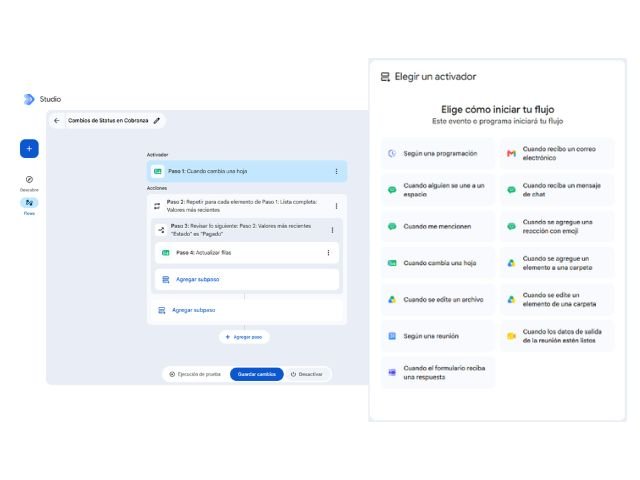

Automating processes within companies requires understanding precisely how data and tools connect. In Google Workspace Studio, building efficient automations relies on a clear architecture composed of two key elements: triggers or Starters and sequential actions or Steps.
1. Starters: The origin point of every workflow
A Starter is the initial event or condition that triggers an automation. No workflow can run without a configured trigger. Workspace Studio classifies Starters into three main categories:
App event triggers
They react to specific actions performed within tools in the Google Workspace ecosystem:
- Gmail: Detects incoming emails. Allows applying advanced filters such as sender, subject keywords, presence of attachments, or specific labels.
- Google Calendar: Initiates the automation at a specified time before or after a meeting (for example, 15 minutes before a scheduled event).
- Google Chat: Monitors spaces or messages where a user is mentioned, a reaction is added, or text containing specific keywords is sent.
- Google Drive, Sheets, and Forms: Activated when a new file is uploaded, data rows are added, or a form response is submitted.
Scheduled triggers (Schedule)
They allow executing recurring tasks at fixed intervals. You can set hourly, daily, weekly, or monthly frequencies to audit data, consolidate reports, or send reminders.
Manual and custom triggers (Manual Input)
They allow starting a workflow upon user request by providing custom parameters (for example, by writing a prompt in the Gemini side panel or executing the workflow from Workspace Studio specifying variables).
2. Steps: The operational tasks of the workflow
Once the workflow is triggered, Steps correspond to the consecutive tasks executed by the platform. You can chain multiple steps together to complete complex processes:
Artificial Intelligence actions (Gemini)
- Ask Gemini: Processes text or extracts contextual information by combining web search with content from your workspace.
- Deep Research: Generates detailed reports by gathering data from internal and external sources, saving the output as a document in Google Drive.
- Content creation: Drafts documents or presentations based on natural language instructions.
Management and communication actions
- Gmail: Draft reply emails, send emails, or apply/remove organizational labels.
- Google Chat: Send direct notifications to users or post messages in team spaces.
- Google Calendar: Reserve time blocks or schedule automated meetings in the calendar.
- Docs and Sheets: Create new documents, add text to existing files, or insert rows of data into spreadsheets.
Logic control and variable steps
- Conditionals (If/Else): Set rules to execute actions only if certain conditions are met.
- Loops (Repeat for each): Allow processing lists of items individually.
- Dynamic variables: Connect information captured in the Starter or a previous Step (such as an email subject or a Gemini response) to reuse it in subsequent steps.
Connect your operational processes with G Nerd
Understanding the interaction between Starters and Steps allows you to build robust workflows, reducing downtime and manual errors in daily operations.
At G Nerd, we support you in implementing Google Workspace, setting up automation policies, and training your team.

