
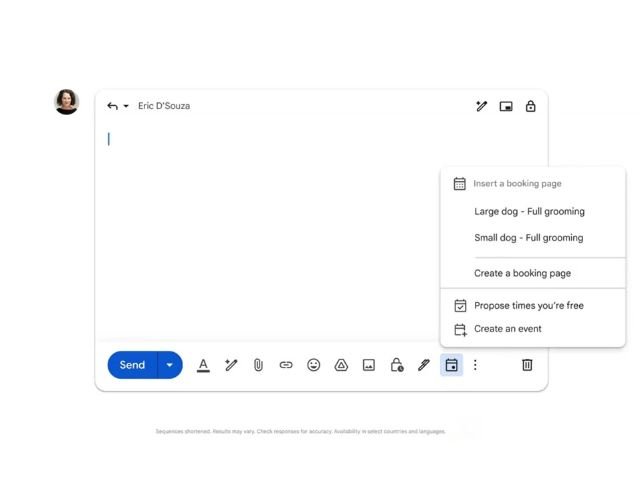

Negotiating meeting times via email often results in long, unnecessary email threads and wasted operational time. Google allows you to link your Google Calendar appointment booking pages directly when composing an email in Gmail, eliminating the need to open extra tabs to check your availability.
What is the Gmail-integrated appointment schedule and how does it benefit your business?
The appointment schedule integration between Google Calendar and Gmail lets you insert an interactive booking link directly into the body of a message. This feature simplifies scheduling meetings with clients, suppliers, or external business partners, offering the following key benefits:
- Real-time synchronization: Available time slots update automatically based on your corporate calendar.
- Automatic confirmations: When an appointment is booked, the event is immediately created on both calendars, and confirmation notifications are sent.
- Shorter sales and support cycles: Eliminates back-and-forth emails to determine meeting dates and times.
Step-by-step guide to inserting your booking link in Gmail
To share your availability and insert your corporate booking link from the Gmail web interface, follow these steps:
- Start a draft email: Open Gmail in your web browser and click the “Compose” button to create a new email, or select “Reply” in an existing email thread.
- Access the Google Calendar menu: In the bottom toolbar of the compose window (next to the attachment and formatting icons), click the Google Calendar icon.
- Select or generate your appointment page: A list of your preconfigured appointment schedules will appear. Choose the booking page you want to share, or select the option to create a new schedule on the spot. The booking link will automatically be inserted into your email text.
G Nerd Note: If your organization uses a custom domain (@yourcompany.com), events scheduled through this feature will comply with the security and availability policies set in your company’s admin console.
Availability and compatible Google Workspace plans
This feature is fully deployed and active for the following account types:
| Account Type | Availability & Conditions |
|---|---|
| Google Workspace for Business | Included at no additional cost on all business plans (Business Starter, Business Standard, Business Plus, and Enterprise editions). |
| Google Workspace Individual | Available to all individual plan subscribers. |
| Personal Google Accounts | Enabled for basic free accounts (with standard scheduling features). |
Optimize your business workflows with G Nerd
Leveraging tools like the Gmail and Google Calendar integration reduces your team’s daily operational workload. However, the true value of Google Workspace is unlocked when the entire company adopts these solutions under consistent security and data governance standards.
At G Nerd, we specialize in consulting, migration, and licensing for Google Workspace. We also train your team to master the platform and apply advanced Artificial Intelligence solutions, like Gemini, to their operational workflows.

