
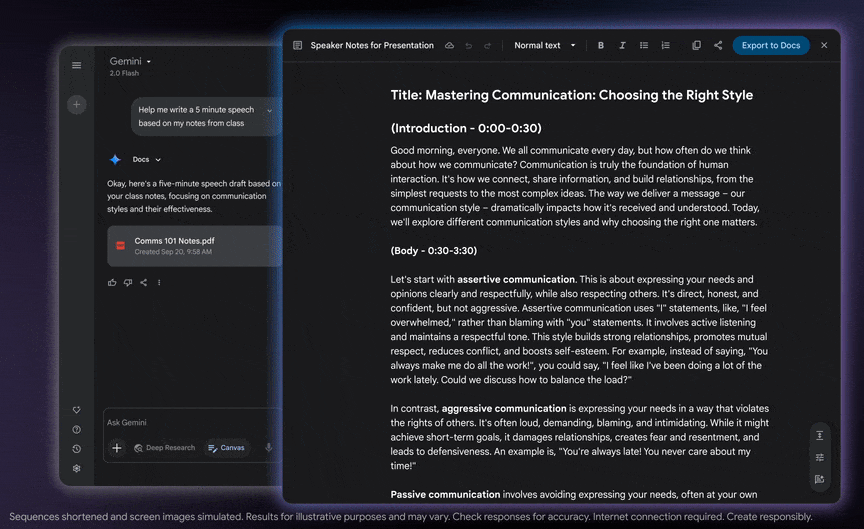
At G Nerd, we are committed to helping you make the most of Google Workspace tools to optimize your daily work. As expert consultants in the implementation and training of these solutions, we know that constant innovation is key. That is why today we want to talk to you about one of Gemini’s most recent and powerful features: Canvas.
Canvas is an intuitive and infinite workspace that allows you to capture complex ideas and transform them into tangible results. It is much more than a simple canvas; it is a space where Gemini’s artificial intelligence joins your creativity to speed up processes and discover new possibilities. Below, we show you 5 amazing things you can do with Canvas to revolutionize the way you work.
1. Code and build apps with a simple description
Can you imagine being able to create an application without being a programming expert? With Gemini’s Canvas, now it’s possible. The “vibe coding” feature allows you to translate complex ideas into functional code. Simply describe what you need, and Canvas takes care of generating the code structure. This not only democratizes software creation, but also significantly accelerates the prototyping phase, allowing development teams to focus on innovation and refinement.
2. Design captivating web pages
Static presentations are a thing of the past. With Canvas, you can build dynamic, visually engaging web pages. Easily integrate elements such as information cards, charts, and other interactive components to present your ideas in a more impactful way. This capability is ideal for creating landing pages, event microsites, or project reports that require a clean, modern interface.
3. Transform data into impactful infographics
Organizing complex information can be a challenge. Canvas helps you simplify it by letting you create infographics. You can structure data, lists, and visual elements into a digestible, easy-to-understand format. From visualizing market data to explaining an internal process, Canvas-generated infographics make information more accessible and memorable for your audience.
4. Convert written content into audio overviews
Productivity isn’t limited to sitting in front of a screen. With Canvas, you can transform your document content into AI-hosted audio discussions. This feature supports over 45 languages, allowing you to consume information while commuting, exercising, or multitasking. It is a powerful tool for learning and reviewing information, offering unprecedented flexibility.
5. Refine comprehensive research reports
If your team works with Google Deep Research reports, Canvas becomes an indispensable ally. It allows you to import, edit, and refine these reports directly on the canvas. Once you have organized the information and added your own feedback, you can export the final result to Google Docs for seamless team collaboration, ensuring your workflow stays connected.
Conclusion
Gemini’s Canvas is not just a new tool; it is an evolution in how we interact with technology to create. From programming to design and information organization, its features are built to break down barriers and boost your productivity. At G Nerd, we are ready to help you integrate these innovations into your company, ensuring you get the most out of Google Workspace and AI tools.
Contact us for a consultation and discover how we can tailor a solution to fit your business needs.
Resources

