
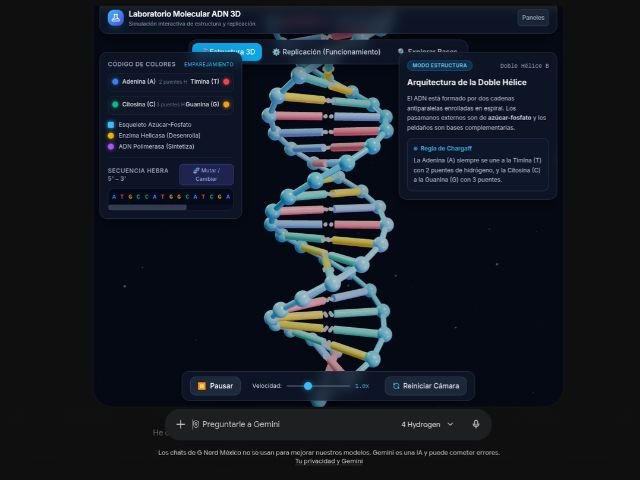

Explaining technical processes, business models, or abstract concepts using plain text and static diagrams often creates comprehension gaps across teams. To transform how we interact with information, Google introduces the ability to generate interactive simulations and models directly inside the Gemini app chat.
From text responses to functional visual tools
Previously, when asking Gemini to explain a complex topic, responses were limited to descriptive paragraphs or static images. With this update, the AI processes your query and generates dynamic visual elements—such as 3D models, interactive tables, or system simulations—tailored specifically to your question.
This feature allows users to explore and manipulate objects directly within the conversation environment. For example, users can:
- Manipulate 3D structures: Rotate, zoom in, and examine complex models (such as DNA strands or molecular representations) from any angle.
- Simulate physical and dynamic systems: Observe the real-time behavior of interconnected variables, such as energy exchange in a pendulum or engineering processes.
- Analyze financial and data models: Explore business projections and metrics (such as cash burn rates) through dynamic tables and grids.
How to trigger and generate simulations with Gemini
Using this capability requires no technical expertise or advanced coding commands. Users simply need to request the information by incorporating visual intent into their prompt:
- Open the Gemini app: Sign in with your corporate Google Workspace account.
- Write your prompt: Use phrases like “show me”, “help me visualize”, or “simulate” along with the concept you want to explore (for example: “Show me how a gear system works in 3D” or “Generate an interactive model to analyze my project’s cash burn rate”).
- Interact with the output: Use your cursor to rotate the model, adjust parameters, or explore the data grids presented.
Admin settings and availability
This feature is enabled by default for all organizations that have the Gemini app service turned on for their domain.
- Admin controls: IT administrators can manage access to these visual tools from the Google Workspace Admin console (Admin console > Generative AI settings).
- Availability: Available to Google Workspace customers, Workspace Individual subscribers, and users meeting minimum age requirements, subject to standard platform usage limits.
Drive innovation in your business with G Nerd
Harnessing the power of generative AI shortens your teams’ learning curves and accelerates operational problem-solving. At G Nerd, we guide your organization through strategic Google Workspace licensing, cloud security policy configuration, and ongoing staff training.