
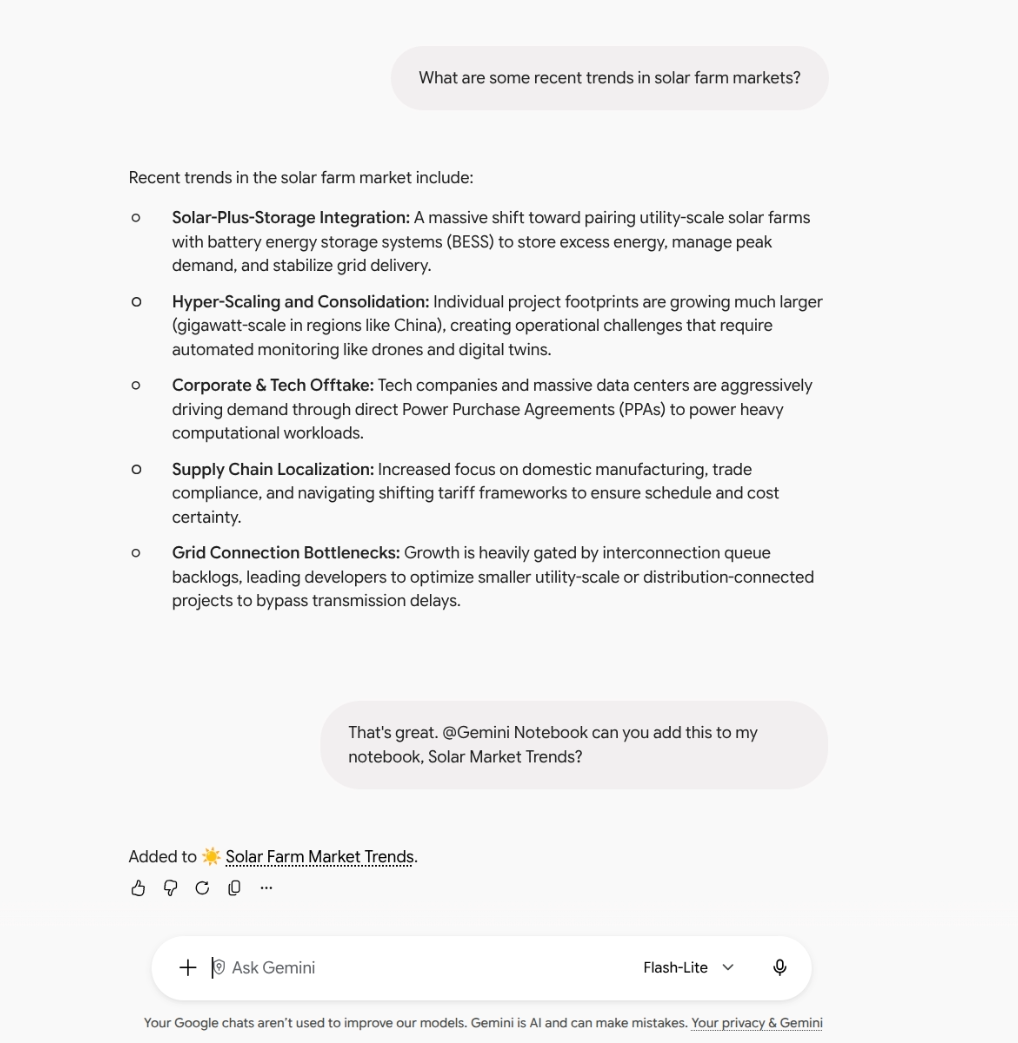

Organizing document sources, synthesizing complex research, and structuring corporate knowledge bases are core tasks in modern knowledge management. Until now, Gemini Notebook (the comprehensive evolution of NotebookLM) functioned as a standalone environment where teams had to manually log in to upload sources and review insights.
To break down the silos between everyday AI conversations and structured document management, Google officially integrates Gemini Notebook as a Connected App inside the Gemini app.
From an open conversation to a structured knowledge base
With this update, you no longer need to switch tabs or toggle between apps to transfer findings or spin up new workspaces. You can now interact with your Gemini Notebook notebooks directly inside the Gemini app chat window using the @Gemini Notebook mention or via Gemini’s automatic contextual detection.
This connection allows the conversations, brainstorming sessions, and research you conduct in the Gemini app to turn—in real time—into organized document sources inside your notebooks.
What actions you can perform from the Gemini app
Using natural language commands, you can manage the entire lifecycle of your notebooks without leaving the chat:
- Create, edit, or delete notebooks: You can prompt Gemini: “Create a Gemini Notebook on solar farm market trends” or request updates to the structure of your existing projects.
- Add and update document sources instantly: Turn any helpful chat exchange into study material with a direct instruction: “Add a copy of this chat to my notebook on the Biology 101 course.”
- Query and list resources: Ask Gemini for a quick inventory of your working documents: “Show me a list of all sources in my notebook on National Parks.”
- Answers grounded in your notebooks: Cross-reference your conversations with the content of your prior research: “What do my Gemini Notebook notebooks say about butterfly migration?”—receiving accurate answers backed directly by your saved sources.
Practical enterprise use cases
- Market research and commercial strategy: During a competitor analysis session in the Gemini app, you can instruct Gemini to automatically archive all agreed-upon key points as a source in your team’s strategic notebook.
- Employee training and onboarding: Team leads can invoke @Gemini Notebook to look up corporate policies or procedure manuals stored in their notebooks and answer team members’ questions in seconds.
- Project management and meeting follow-ups: After outlining a work plan or summarizing operational requirements, you can create a dedicated project notebook with a single conversational command.
Administration, controls, and availability
The integration comes with clear governance policies for organizations operating on Google Workspace:
- Admin controls: Access to the Gemini Notebook connected app is enabled by default. It is available to users belonging to an Organizational Unit (OU) or group where both the Gemini app and Gemini Notebook are enabled in the Admin console.
- End-user settings: Users can manage or turn off the integration under Settings > Connected apps inside the Gemini app (enabled by default globally, except in the European Economic Area, where it is off by default).
- Availability and plans: Generally available for all Google Workspace customers, Google Workspace Individual subscribers, and users with personal Google accounts.
Centralize your organization’s intelligence with G Nerd
Connecting Gemini’s conversational assistant with the analytical depth of Gemini Notebook enables companies to turn scattered data into agile decisions and accessible knowledge. At G Nerd, we guide your business through the strategic adoption of Google Workspace, secure document architecture design, and continuous staff training to maximize Google’s AI tools.
Resources
- Take actions on your notebooks from Gemini Notebook directly in the Gemini app
- Gemini Manages Complex Tasks in the Background Across Google Workspace
- “Specialized Intelligence” in Gemini Notebook: Connect Your Google Play Books and Consult Expert Authors
- How to Use Guided Learning Tools in Gemini to Train Your Company