
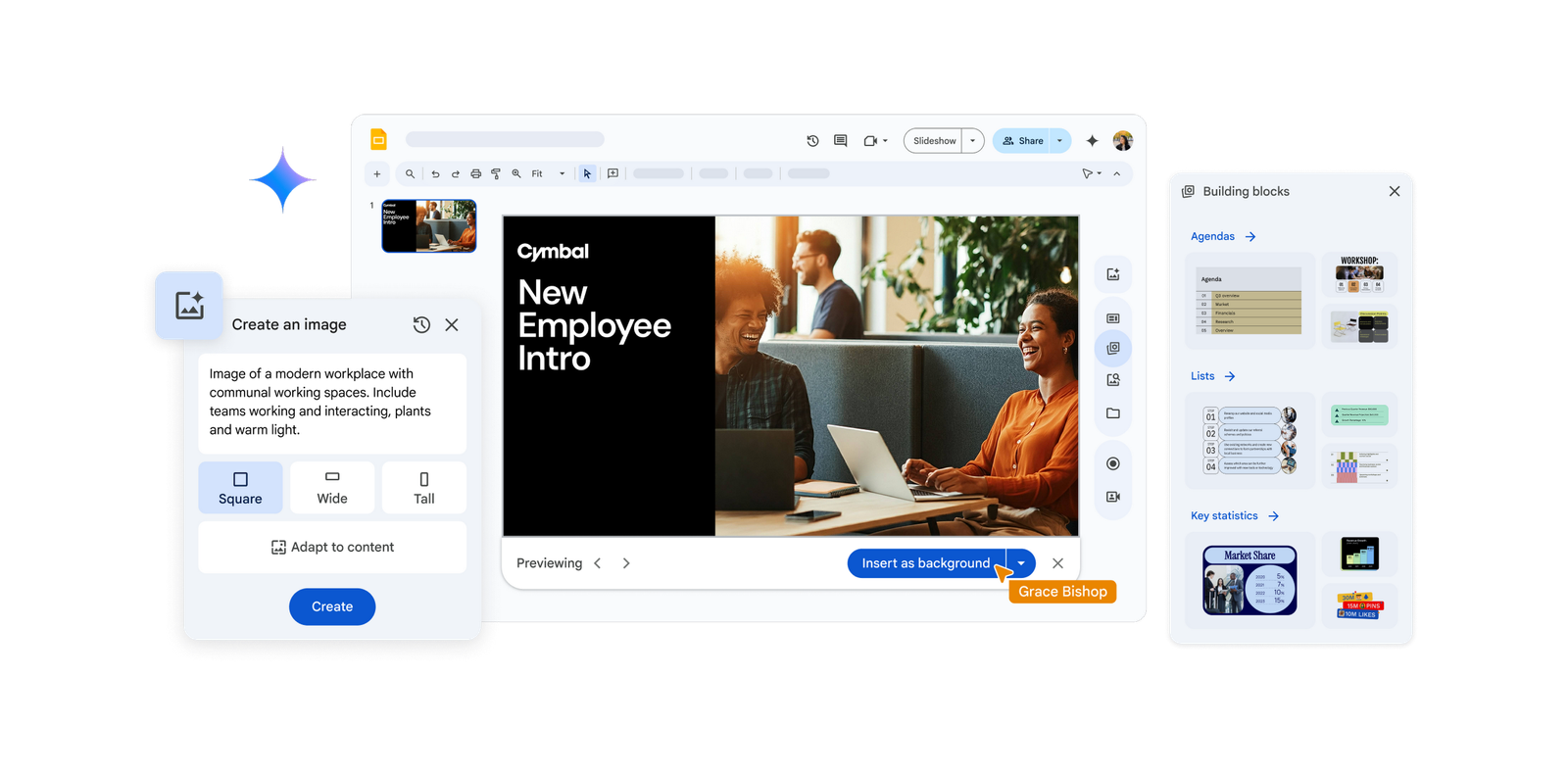
Tell a story with a suite of AI-powered image generation capabilities
Storytelling is more impactful with visuals, and we often spend time searching for the right image or editing them to ensure they fit our overall vision for the presentation. Now, improvements in image generation and editing in Slides can help bring your presentation to life in new and impactful ways.
Recently, updated image generation features were announced with Nano Banana Pro, Google’s latest text-to-image model, now available for Google Workspace customers. With Nano Banana Pro, you can generate realistic, highly detailed images, as well as photorealistic text and images of people, not only in Slides but also in Gmail, Docs, Sheets, and more.

New ways have also been implemented to create images of different sizes based on the dimensions you select (19:6, 16:9, 1:1) using Create an image.
These features facilitate not only the creation of impactful images but also their editing. You can already remove the background from your images with the help of AI, and soon you will also be able to expand them so you always have the perfect image to create your presentation.
Design beautiful and impactful slides with less effort
Sometimes the hardest part of creating a presentation is simply knowing where to start. Now it’s easier with the revamped library of high-quality modern templates, covering areas such as annual planning, new client proposals, workshop facilitation, and more. Add only the slides you need or insert the entire presentation to build your narrative quickly, with fully editable templates that allow you to customize colors and fonts.

When creating a presentation, you might copy slides from an existing template to save time, but then spend time formatting elements like the agenda or key stats. This process has been optimized with a new feature in the sidebar called “building blocks.” These are pre-formatted, fully editable structures that help you quickly create flawless slides, so you can insert custom quotes, key ideas, agendas, statistics, and more. Advanced Google Docs users are likely already familiar with building blocks; this is the same useful feature now incorporated into the new Slides canvas!

Formatting is also getting simpler: you can adjust groups of objects on a slide to different sizes while maintaining image quality. And what would a presentation be without visuals? For a long time, users have been able to add, delete, and adjust photos, videos, and GIFs in a presentation. Now, you can bring your slides to life with an expanded web and stock media library, filled with millions of high-quality stock images, web images, GIFs, and more, so you can add visual interest and stand out to keep your audience engaged.

Focus on your presentation, not your design skills
These improvements make it easier than ever to create engaging and impactful slides in less time and without the need for special design skills, so you can focus on the success of your presentation. Discover more about the latest updates and start using Slides today.
Is your company still not taking full advantage of Google Workspace? At G Nerd, we are experts in implementing and consulting on the tools this suite offers you. Contact us today and let us help you transform the way your team works, collaborates, and grows.