
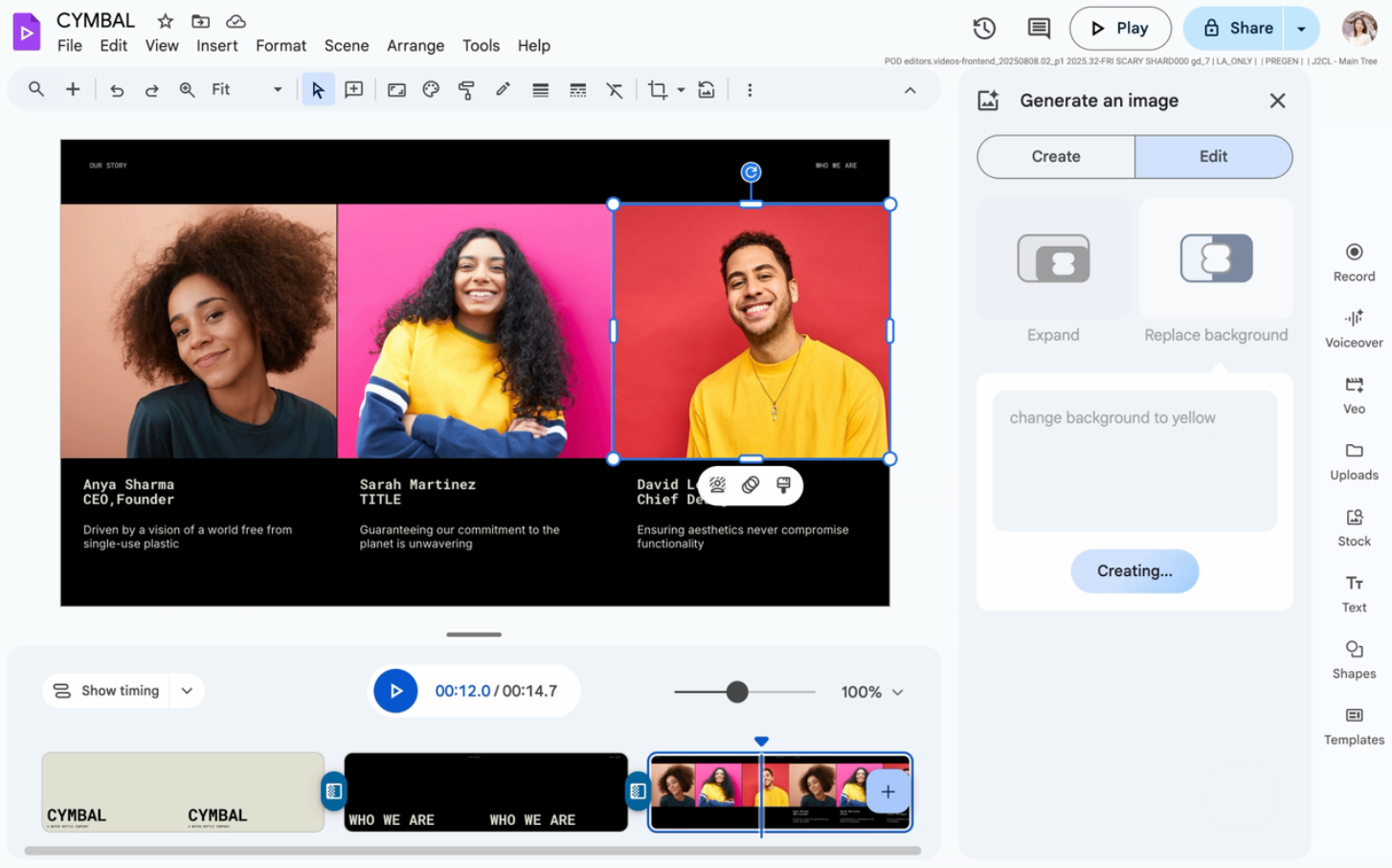

We know that the visual quality of your presentations and videos is crucial for your business’s success. A well-placed image with the perfect background can make the difference between a memorable message and one that gets lost. That is why we are excited to share an update that will transform the way you create content: the integration of powerful AI-powered image editing functions powered by Gemini in Google Slides and Google Vids.
This is a strategic move by Google to democratize professional design, allowing any Google Workspace user to achieve high-quality results without needing to be an expert in editing software. Say goodbye to external tools!
1. The Power of AI Background Replacement
The first major new feature is the ability to modify the background of any image instantly and with a simple text prompt. This function goes far beyond simply “removing the background”; you can now replace the background with any scenario you can imagine, thanks to Gemini’s generative Artificial Intelligence.
How does this benefit your team?
-
- Professionalize Corporate Portraits: Say goodbye to distracting backgrounds in team photos. Instantly replace the background of all your employees’ photos with a professional, unified background that reflects your company’s brand for “Meet the Team” slides or profiles.
- Contextualize Products: If your company sells products, you can take a standard photo of an item (like a chair on a white background) and, using a text command like “minimalist product shot in a modern studio,” place it in a realistic environment, helping customers visualize it better.
- Tailored Presentations: Quickly adapt the visual elements of a proposal to a specific client. For example, show a software solution being used in your prospect’s office environment or industry, making the presentation deeply resonate with them.
Simply click on the image, select the “Generate an image” icon in the side panel, choose “Replace background,” and enter your desired description. The AI will work its magic.
2. Smart Image Expansion: Resize Without Loss of Quality
Have you ever had a small image that needed to fill an entire slide, but stretching it caused it to pixelate or distort? The second feature arriving is the intelligent expansion of your images’ background. Gemini can now analyze the content and context of your photo to intelligently and coherently expand the background.
This allows you to fluidly resize and reframe your visual elements without compromising quality. If you have a key image in Google Slides and need to maximize its impact by making it larger, the expansion tool lets you select a new aspect ratio and preview different options for generated backgrounds before inserting it. This is an indispensable tool for creating clean designs with a high level of detail, ensuring your visual message is as powerful as the text accompanying it.
Availability and Next Steps
These powerful AI image editing tools are available for Google Workspace customers in the following editions:
-
- Business Standard
- Business Plus
- Enterprise Standard and Plus
- Customers with the Gemini Education or Gemini Education Premium add-on
- Google AI Pro and Ultra
Ready to take your presentations and videos to the next level? At G Nerd, we stay on top of every Google Workspace update. Contact our consultants today to ensure your organization is fully leveraging all the Artificial Intelligence features that Google Slides and Google Vids have to offer. Simplify your workflow and start creating professional content effortlessly.
Your next presentation with Google Workspace will be a masterpiece!


2 Comments