
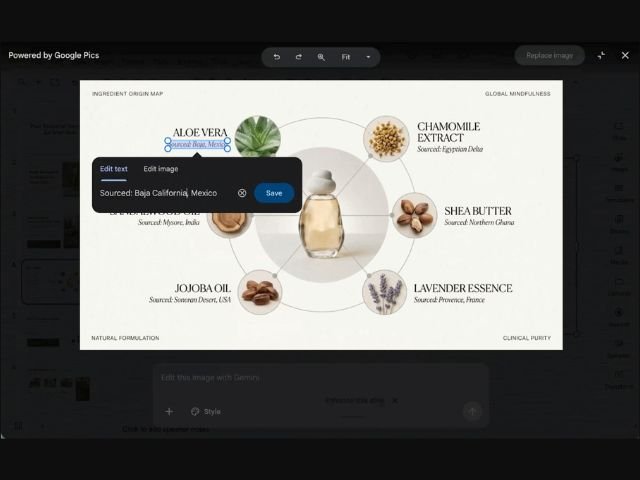

Visual communication has become an essential component of corporate productivity, from creating executive presentations to designing marketing materials and social media content. To eliminate the need for external design software or complex tools, Google launches Google Pics, a native AI image creation and editing solution built directly into the Google Workspace ecosystem.
What is Google Pics and where is it integrated?
Google Pics is an AI-powered graphic generation and editing platform driven by Google’s advanced vision model. Unlike traditional editors, it requires no software installation or constant tab switching in your browser.
Currently, the tool is natively available in:
- Google Docs and Google Slides: Click on any image embedded in your document or presentation to open the Google Pics editor as an overlay window.
- Standalone web platform: Access directly from pics.new to create compositions from scratch or import files from your computer, Google Drive, or Google Photos.
- Google Drive (upcoming integration): In the coming weeks, you will be able to edit images stored in the cloud directly.
Key capabilities: Precise object control and translation
Google Pics stands out for its ability to analytically understand an image’s composition, offering object-oriented editing features:
- Object segmentation: Isolate specific elements within an image to modify, move, or remove them using text prompts without altering the background or the rest of the design.
- Text editing and translation in images: Automatically detects text inside graphics or posters to modify content, change typography, or translate it into more than 25 languages while maintaining the original style.
- Multiple generation: When writing a prompt, the AI offers various visual variations so you can choose the option that best fits your desired concept.
- Upscaling: Boost image and illustration quality up to 2K and 4K resolutions with a single click.
- Real-time collaboration: Share the editing canvas with your team via a link to co-design and make interactive adjustments together.
Practical business use cases
Integrating Google Pics into your daily workflow accelerates multiple operational areas:
- Marketing collateral design: Create and adapt digital assets, banners, or brochures for global campaigns by translating embedded text in seconds.
- Product visualization: Place product sketches or photos in different advertising settings and backgrounds without needing photo shoots.
- Executive presentations: Enhance Google Slides decks by removing unwanted elements or improving the quality of older graphics.
Availability and account requirements
Google Pics is enabled by default for organizations with eligible Google Workspace subscriptions:
- Business: Standard and Plus
- Enterprise: Standard and Plus
- Add-ons: Google AI Pro for Education, Google AI Pro, and Ultra.
Domain administrators can manage access permissions and usage policies from the Google Workspace Admin Console.
Empower your business visual communication with G Nerd
Incorporating AI creative tools into your daily applications reduces operational workload, professionalizes deliverables, and streamlines team collaboration. At G Nerd, we support you through strategic Google Workspace licensing selection, admin console setup, and ongoing employee training.


One Comment