

In the world of productivity and data management, time is the most valuable resource. If you are a frequent Google Workspace user, you know that until very recently, closing a registration form or a survey required manual intervention: you had to log into the tool at the exact moment and disable the receipt of responses.
That has changed! Thanks to the latest Google update (officially announced in January 2026), you can now configure your forms to stop accepting responses automatically. At G Nerd, as expert Google Workspace consultants, we explain how to take advantage of this feature to optimize your processes.
Why is it important to automate your form closing?
Imagine you are organizing a webinar with limited spots or an exam with a strict deadline. Relying on a manual process increases the risk of receiving late responses or exceeding the allowed registration limit. Automation allows you to:
-
- Save time: You don’t need to keep an eye on the clock to close the form.
- Avoid errors: You ensure that no one registers after the deadline.
- Professionalism: You provide a clear experience to users with personalized closing messages.
Step by step: How to set up automatic closing
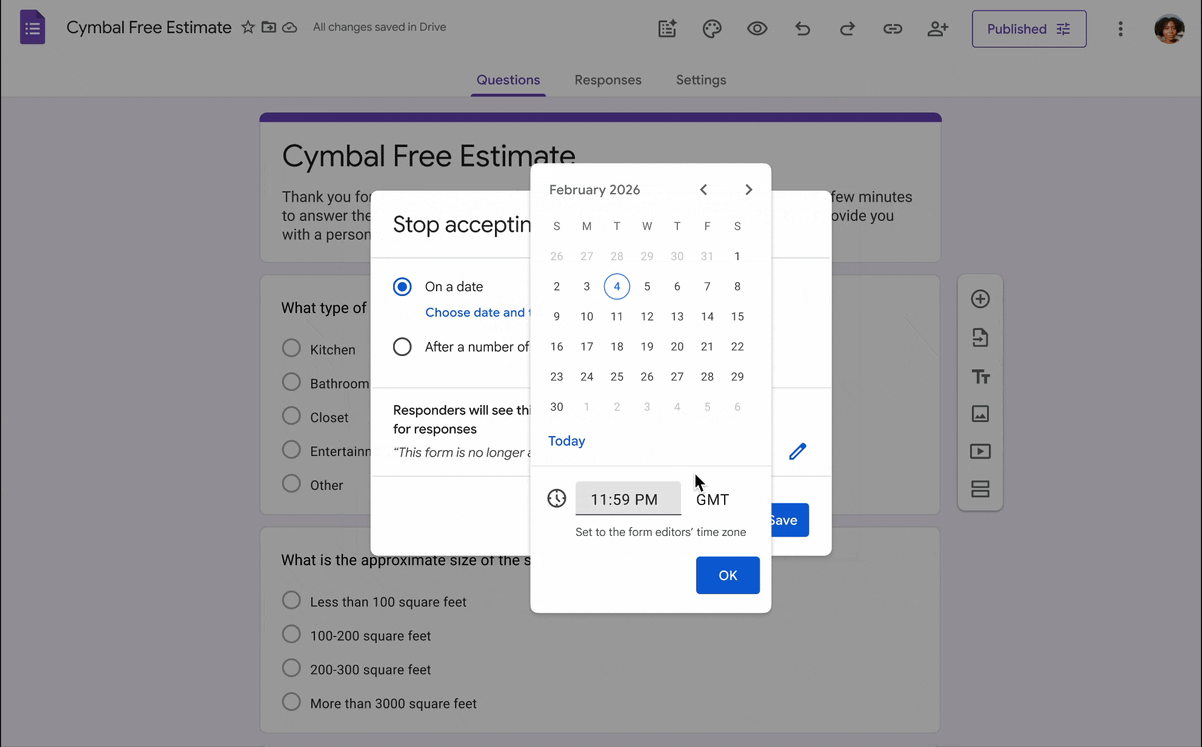
This new functionality allows for two types of limits: by date and time or by number of responses. Here is how to activate it:
-
- Open your form: Go to Google Forms and select the file you want to edit.
- Go to the Responses tab: At the top center, click on “Responses.”
- Configure the closing: Next to the “Accepting responses” toggle, you will now find the option to Set closing date or response limit.
- Choose your criteria:
-
- By date: Select the exact day and time the form should stop working.
- By response limit: Indicate the maximum number of submissions allowed (e.g., “100 responses”).
-
- Personalize the message: Write the message users will see when they try to access once the form is closed (e.g., “Thank you for your interest, the capacity for this event has been reached”).
- Save and activate: You’re all set! Google will handle the rest.
Benefits for your company with Google Workspace
This update is especially useful for Human Resources departments, Sales teams, and event organizers using Google Workspace. By removing the need for third-party add-ons, data management becomes more secure and native within the Google ecosystem.
At G Nerd, we help companies like yours implement these tools efficiently. If you don’t have Google Workspace yet or want to make the most of your current licenses, contact us!
Need help migrating to Google Workspace or training your team? At G Nerd, we are experts in transforming digital collaboration for businesses.
Resources